Documentation Index
Fetch the complete documentation index at: https://docs.baseten.co/llms.txt
Use this file to discover all available pages before exploring further.
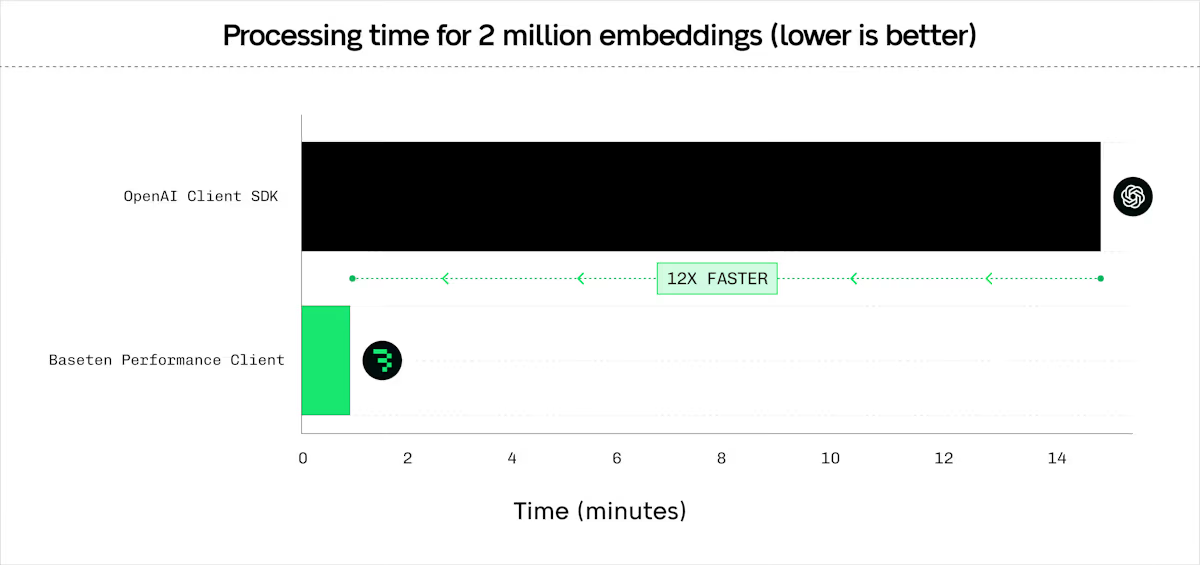
Built in Rust and integrated with Python, Node.js, and native Rust, the Performance Client handles concurrent POST requests efficiently.
It releases the Python GIL while executing requests, enabling simultaneous sync and async usage.
Benchmarks show the Performance Client reaches 1200+ requests per second per client.
Use it with Baseten deployments or third-party providers like OpenAI.
Install the client
Install the Performance Client:uv pip install baseten_performance_client>=0.1.0
To install the Performance Client for JavaScript, use npm:npm install @basetenlabs/performance-client
Get started
To initialize the Performance Client in Python, import the class and provide your base URL and API key:from baseten_performance_client import PerformanceClient
client = PerformanceClient(
base_url="https://model-YOUR_MODEL_ID.api.baseten.co/environments/production/sync",
api_key="YOUR_API_KEY"
)
To initialize the Performance Client with JavaScript, require the package and create a new instance:const { PerformanceClient } = require("@basetenlabs/performance-client");
const client = new PerformanceClient(
"https://model-YOUR_MODEL_ID.api.baseten.co/environments/production/sync",
process.env.BASETEN_API_KEY
);
The client also works with third-party providers like OpenAI by replacing the base_url.
Advanced setup
Configure HTTP version selection and connection pooling for optimal performance.
To configure HTTP version and connection pooling in Python, use the http_version parameter and HttpClientWrapper:from baseten_performance_client import PerformanceClient, HttpClientWrapper
# HTTP/1.1 (default, better for high concurrency)
client_http1 = PerformanceClient(BASE_URL, API_KEY, http_version=1)
# HTTP/2 (not recommended on Baseten)
client_http2 = PerformanceClient(BASE_URL, API_KEY, http_version=2)
# Connection pooling for multiple clients
wrapper = HttpClientWrapper(http_version=1)
client1 = PerformanceClient(base_url="https://api1.example.com", client_wrapper=wrapper)
client2 = PerformanceClient(base_url="https://api2.example.com", client_wrapper=wrapper)
To configure HTTP version and connection pooling with JavaScript, pass the version as the third argument and use HttpClientWrapper:const { PerformanceClient, HttpClientWrapper } = require('@basetenlabs/performance-client');
// HTTP/1.1 (default, better for high concurrency)
const clientHttp1 = new PerformanceClient(BASE_URL, API_KEY, 1);
// HTTP/2
const clientHttp2 = new PerformanceClient(BASE_URL, API_KEY, 2);
// Connection pooling for multiple clients
const wrapper = new HttpClientWrapper(1);
const pooledClient1 = new PerformanceClient(BASE_URL_1, API_KEY, 1, wrapper);
const pooledClient2 = new PerformanceClient(BASE_URL_2, API_KEY, 1, wrapper);
Core features
Embeddings
The client provides efficient embedding requests with configurable batching, concurrency, and latency optimizations. Compatible with BEI.
To generate embeddings with Python, configure a RequestProcessingPreference and call client.embed():from baseten_performance_client import PerformanceClient, RequestProcessingPreference
client = PerformanceClient(base_url=BASE_URL, api_key=API_KEY)
texts = ["Hello world", "Example text", "Another sample"] * 10
preference = RequestProcessingPreference(
batch_size=16,
max_concurrent_requests=256,
max_chars_per_request=10000,
hedge_delay=0.5,
timeout_s=360,
total_timeout_s=600,
extra_headers={"x-custom-header": "value"}
)
response = client.embed(
input=texts,
model="my_model",
preference=preference
)
print(f"Model used: {response.model}")
print(f"Total tokens used: {response.usage.total_tokens}")
print(f"Total time: {response.total_time:.4f}s")
# Convert to numpy array (requires numpy)
numpy_array = response.numpy()
print(f"Embeddings shape: {numpy_array.shape}")
For async usage, call await client.async_embed(input=texts, model="my_model", preference=preference). To generate embeddings with JavaScript, configure a RequestProcessingPreference and call client.embed():const { PerformanceClient, RequestProcessingPreference } = require('@basetenlabs/performance-client');
const client = new PerformanceClient(BASE_URL, API_KEY);
const texts = ["Hello world", "Example text", "Another sample"];
const preference = new RequestProcessingPreference(
32, // maxConcurrentRequests
4, // batchSize
10000, // maxCharsPerRequest
360.0, // timeoutS
0.5 // hedgeDelay
);
const response = await client.embed(
texts, // input
"my_model", // model
null, // encodingFormat
null, // dimensions
null, // user
preference // preference parameter
);
console.log(`Model used: ${response.model}`);
console.log(`Total tokens used: ${response.usage.total_tokens}`);
console.log(`Total time: ${response.total_time.toFixed(4)}s`);
Generic batch POST
Send HTTP requests to any URL with any JSON payload. Compatible with Engine-Builder-LLM and other models. Set stream=False for SSE endpoints.
To send batch POST requests with Python, define your payloads and call client.batch_post():from baseten_performance_client import PerformanceClient, RequestProcessingPreference
client = PerformanceClient(base_url=BASE_URL, api_key=API_KEY)
payloads = [
{"model": "my_model", "prompt": "Batch request 1", "stream": False},
{"model": "my_model", "prompt": "Batch request 2", "stream": False}
] * 10
preference = RequestProcessingPreference(
max_concurrent_requests=96,
timeout_s=720,
hedge_delay=0.5,
extra_headers={"x-custom-header": "value"}
)
response = client.batch_post(
url_path="/v1/completions",
payloads=payloads,
preference=preference,
method="POST"
)
print(f"Total time: {response.total_time:.4f}s")
Supported methods: GET, POST, PUT, PATCH, DELETE, HEAD, OPTIONS.For async usage, call await client.async_batch_post(url_path, payloads, preference, method). To send batch POST requests with JavaScript, define your payloads and call client.batchPost():const { PerformanceClient, RequestProcessingPreference } = require('@basetenlabs/performance-client');
const client = new PerformanceClient(BASE_URL, API_KEY);
const payloads = [
{ model: "my_model", prompt: "Batch request 1", stream: false },
{ model: "my_model", prompt: "Batch request 2", stream: false }
];
const preference = new RequestProcessingPreference(
32, // maxConcurrentRequests
undefined, // batchSize
undefined, // maxCharsPerRequest
360.0, // timeoutS
0.5 // hedgeDelay
);
const response = await client.batchPost(
"/v1/completions",
payloads,
preference,
"POST"
);
console.log(`Total time: ${response.total_time.toFixed(4)}s`);
Reranking
Rerank documents by relevance to a query. Compatible with BEI, BEI-Bert, and text-embeddings-inference reranking endpoints.
To rerank documents with Python, provide a query and list of documents to client.rerank():from baseten_performance_client import PerformanceClient, RequestProcessingPreference
client = PerformanceClient(base_url=BASE_URL, api_key=API_KEY)
query = "What is the best framework?"
documents = ["Doc 1 text", "Doc 2 text", "Doc 3 text"]
preference = RequestProcessingPreference(
batch_size=16,
max_concurrent_requests=32,
timeout_s=360,
max_chars_per_request=256000,
hedge_delay=0.5,
extra_headers={"x-rerank-header": "value"}
)
response = client.rerank(
query=query,
texts=documents,
model="rerank-model",
return_text=True,
preference=preference
)
for res in response.data:
print(f"Index: {res.index} Score: {res.score}")
For async usage, call await client.async_rerank(query, texts, model, return_text, preference). To rerank documents with JavaScript, provide a query and list of documents to client.rerank():const { PerformanceClient, RequestProcessingPreference } = require('@basetenlabs/performance-client');
const client = new PerformanceClient(BASE_URL, API_KEY);
const query = "What is the best framework?";
const documents = ["Doc 1 text", "Doc 2 text", "Doc 3 text"];
const preference = new RequestProcessingPreference(
32, // maxConcurrentRequests
16, // batchSize
undefined, // maxCharsPerRequest
360.0, // timeoutS
0.5 // hedgeDelay
);
const response = await client.rerank(query, documents, "rerank-model", true, preference);
response.data.forEach(res => console.log(`Index: ${res.index} Score: ${res.score}`));
Classification
Classify text inputs into categories. Compatible with BEI and text-embeddings-inference classification endpoints.
To classify text with Python, provide a list of inputs to client.classify():from baseten_performance_client import PerformanceClient, RequestProcessingPreference
client = PerformanceClient(base_url=BASE_URL, api_key=API_KEY)
texts_to_classify = [
"This is great!",
"I did not like it.",
"Neutral experience."
]
preference = RequestProcessingPreference(
batch_size=16,
max_concurrent_requests=32,
timeout_s=360.0,
max_chars_per_request=256000,
hedge_delay=0.5,
extra_headers={"x-classify-header": "value"}
)
response = client.classify(
inputs=texts_to_classify,
model="classification-model",
preference=preference
)
for group in response.data:
for result in group:
print(f"Label: {result.label}, Score: {result.score}")
For async usage, call await client.async_classify(inputs, model, preference). To classify text with JavaScript, provide a list of inputs to client.classify():const { PerformanceClient, RequestProcessingPreference } = require('@basetenlabs/performance-client');
const client = new PerformanceClient(BASE_URL, API_KEY);
const texts = ["This is great!", "I did not like it.", "Neutral experience."];
const preference = new RequestProcessingPreference(32, 16, undefined, 360.0, 0.5);
const response = await client.classify(texts, "classification-model", preference);
response.data.forEach(group => {
group.forEach(result => console.log(`Label: ${result.label}, Score: ${result.score}`));
});
Advanced features
The RequestProcessingPreference class provides unified configuration for all request processing parameters.
To configure request processing in Python, create a RequestProcessingPreference instance:from baseten_performance_client import RequestProcessingPreference
preference = RequestProcessingPreference(
max_concurrent_requests=64,
batch_size=32,
timeout_s=30.0,
hedge_delay=0.5,
hedge_budget_pct=0.15,
retry_budget_pct=0.08,
total_timeout_s=300.0
)
To configure request processing with JavaScript, create a RequestProcessingPreference instance:const { RequestProcessingPreference } = require('@basetenlabs/performance-client');
const preference = new RequestProcessingPreference(
64, // maxConcurrentRequests
32, // batchSize
undefined, // maxCharsPerRequest
30.0, // timeoutS
0.5, // hedgeDelay
undefined, // totalTimeoutS
0.15, // hedgeBudgetPct
0.08 // retryBudgetPct
);
Parameter reference
| Parameter | Type | Default | Range | Description |
|---|
max_concurrent_requests | int | 128 | 1-1024 | Maximum parallel requests |
batch_size | int | 128 | 1-1024 | Items per batch |
timeout_s | float | 3600.0 | 1.0-7200.0 | Per-request timeout in seconds |
hedge_delay | float | None | 0.2-30.0 | Hedge delay in seconds (see below) |
hedge_budget_pct | float | 0.10 | 0.0-3.0 | Percentage of requests allowed for hedging |
retry_budget_pct | float | 0.05 | 0.0-3.0 | Percentage of requests allowed for retries |
total_timeout_s | float | None | ≥timeout_s | Total operation timeout |
extra_headers | dict | None | - | Custom headers to include with all requests |
Hedge delay sends duplicate requests after a specified delay to reduce p99 latency. After the delay, the request is cloned and raced against the original. The 429 and 5xx errors are always retried automatically.
Select HTTP version
Choose between HTTP/1.1 and HTTP/2 for optimal performance. HTTP/1.1 is recommended for high concurrency workloads.
To select the HTTP version in Python, use the http_version parameter:from baseten_performance_client import PerformanceClient
# HTTP/1.1 (default, better for high concurrency)
client_http1 = PerformanceClient(BASE_URL, API_KEY, http_version=1)
# HTTP/2 (better for single requests)
client_http2 = PerformanceClient(BASE_URL, API_KEY, http_version=2)
To select the HTTP version with JavaScript, pass the version as the third argument:const { PerformanceClient } = require('@basetenlabs/performance-client');
// HTTP/1.1 (default, better for high concurrency)
const clientHttp1 = new PerformanceClient(BASE_URL, API_KEY, 1);
// HTTP/2 (better for single requests)
const clientHttp2 = new PerformanceClient(BASE_URL, API_KEY, 2);
Share connection pools
Share connection pools across multiple client instances to reduce overhead when connecting to multiple endpoints.
To share a connection pool in Python, create an HttpClientWrapper and pass it to each client:from baseten_performance_client import PerformanceClient, HttpClientWrapper
wrapper = HttpClientWrapper(http_version=1)
client1 = PerformanceClient(base_url="https://api1.example.com", client_wrapper=wrapper)
client2 = PerformanceClient(base_url="https://api2.example.com", client_wrapper=wrapper)
To share a connection pool with JavaScript, create an HttpClientWrapper and pass it to each client:const { PerformanceClient, HttpClientWrapper } = require('@basetenlabs/performance-client');
const wrapper = new HttpClientWrapper(1);
const client1 = new PerformanceClient(BASE_URL_1, API_KEY, 1, wrapper);
const client2 = new PerformanceClient(BASE_URL_2, API_KEY, 1, wrapper);
Cancel operations
Cancel long-running operations using CancellationToken. The token provides immediate cancellation, resource cleanup, Ctrl+C support, token sharing across operations, and status checking with is_cancelled().
To cancel operations in Python, create a CancellationToken and pass it to your preference:from baseten_performance_client import (
PerformanceClient,
CancellationToken,
RequestProcessingPreference
)
import threading
import time
client = PerformanceClient(base_url=BASE_URL, api_key=API_KEY)
cancel_token = CancellationToken()
preference = RequestProcessingPreference(
max_concurrent_requests=32,
batch_size=16,
timeout_s=360.0,
cancel_token=cancel_token
)
def long_operation():
try:
response = client.embed(
input=["large batch"] * 1000,
model="embedding-model",
preference=preference
)
print("Operation completed")
except ValueError as e:
if "cancelled" in str(e):
print("Operation was cancelled")
threading.Thread(target=long_operation).start()
time.sleep(2)
cancel_token.cancel()
To cancel operations with JavaScript, create a CancellationToken and pass it to your preference:const { PerformanceClient, CancellationToken, RequestProcessingPreference } = require('@basetenlabs/performance-client');
const client = new PerformanceClient(BASE_URL, API_KEY);
const cancelToken = new CancellationToken();
const preference = new RequestProcessingPreference(
32, 16, undefined, 360.0, undefined, undefined,
undefined, undefined, undefined, undefined, cancelToken
);
const operation = client.embed(
["large batch"].concat(Array(1000).fill("sample")),
"model",
undefined,
undefined,
undefined,
preference
);
setTimeout(() => cancelToken.cancel(), 2000);
try {
const response = await operation;
console.log("Operation completed");
} catch (error) {
if (error.message.includes("cancelled")) {
console.log("Operation was cancelled");
}
}
Handle errors
The client raises standard exceptions for error conditions:
HTTPError: Authentication failures (403), server errors (5xx), endpoint not found (404).
Timeout: Request or total operation timeout based on timeout_s or total_timeout_s.
ValueError: Invalid input parameters (empty input list, invalid batch size, inconsistent embedding dimensions).
To handle errors in Python, catch the appropriate exception types:import requests
from baseten_performance_client import PerformanceClient, RequestProcessingPreference
client = PerformanceClient(base_url=BASE_URL, api_key=API_KEY)
preference = RequestProcessingPreference(timeout_s=30.0)
try:
response = client.embed(input=["text"], model="model", preference=preference)
print(f"Model used: {response.model}")
except requests.exceptions.HTTPError as e:
print(f"HTTP error: {e}, status code: {e.response.status_code}")
except requests.exceptions.Timeout as e:
print(f"Timeout error: {e}")
except ValueError as e:
print(f"Input error: {e}")
To handle errors with JavaScript, use a try-catch block and inspect the error object:const { PerformanceClient, RequestProcessingPreference } = require('@basetenlabs/performance-client');
const client = new PerformanceClient(BASE_URL, API_KEY);
const preference = new RequestProcessingPreference(32, 16, undefined, 30.0);
try {
const response = await client.embed(texts, "model", undefined, undefined, undefined, preference);
console.log("Success:", response.model);
} catch (error) {
if (error.response) {
console.log(`HTTP error: ${error.response.status}`);
} else if (error.code === 'TIMEOUT') {
console.log("Timeout error");
} else {
console.log(`Error: ${error.message}`);
}
}
Environment variables
BASETEN_API_KEY: Your Baseten API key. Also checks OPENAI_API_KEY as fallback.
PERFORMANCE_CLIENT_LOG_LEVEL: Logging level. Overrides RUST_LOG. Valid values: trace, debug, info, warn, error. Default: warn.
PERFORMANCE_CLIENT_REQUEST_ID_PREFIX: Custom prefix for request IDs. Default: perfclient.
To set the logging level, use the PERFORMANCE_CLIENT_LOG_LEVEL environment variable:
PERFORMANCE_CLIENT_LOG_LEVEL=info python script.py
PERFORMANCE_CLIENT_LOG_LEVEL=debug cargo run
The PERFORMANCE_CLIENT_LOG_LEVEL variable takes precedence over RUST_LOG.
Use with Rust
The Performance Client is also available as a native Rust library.
To use the Performance Client in Rust, add the dependencies and create a PerformanceClientCore instance:
use baseten_performance_client_core::{PerformanceClientCore, ClientError};
use tokio;
#[tokio::main]
async fn main() -> Result<(), Box<dyn std::error::Error>> {
let api_key = std::env::var("BASETEN_API_KEY").expect("BASETEN_API_KEY not set");
let base_url = "https://model-YOUR_MODEL_ID.api.baseten.co/environments/production/sync";
let client = PerformanceClientCore::new(base_url, Some(api_key), None, None);
// Generate embeddings
let texts = vec!["Hello world".to_string(), "Example text".to_string()];
let embedding_response = client.embed(
texts,
"my_model".to_string(),
Some(16),
Some(32),
Some(360.0),
Some(256000),
Some(0.5),
Some(360.0),
).await?;
println!("Model: {}", embedding_response.model);
println!("Total tokens: {}", embedding_response.usage.total_tokens);
// Send batch POST requests
let payloads = vec![
serde_json::json!({"model": "my_model", "input": ["Rust sample 1"]}),
serde_json::json!({"model": "my_model", "input": ["Rust sample 2"]}),
];
let batch_response = client.batch_post(
"/v1/embeddings".to_string(),
payloads,
Some(32),
Some(360.0),
Some(0.5),
Some(360.0),
None,
).await?;
println!("Batch POST total time: {:.4}s", batch_response.total_time);
Ok(())
}
Add these dependencies to your Cargo.toml:
[dependencies]
baseten_performance_client_core = "0.1.4"
tokio = { version = "1.0", features = ["full"] }
serde_json = "1.0"